Sandbox + Docker Development Workflow
Table of Contents
- What we're building
- Start PostgreSQL
- Start Redis
- Create the backend
- Connect backend → PostgreSQL and Redis
- Run it and publish the port
- Test the API
- What just happened
- Beginner Pitfalls
1. What we're building
A small, realistic backend dev environment, entirely inside the one sandbox we've been using since Part 2: a Node.js API, a PostgreSQL database, and a Redis cache, all running as separate processes but talking to each other.
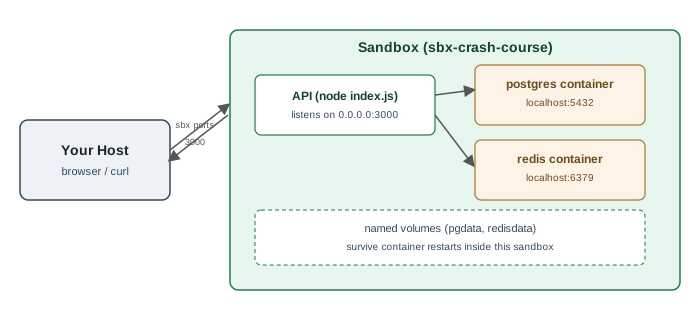
The finished version of everything below lives in
examples/sandbox-dev-workflow/
— useful to compare against if something doesn't line up.
2. Start PostgreSQL
Inside the sandbox (sbx run --name sbx-crash-course to reattach):
docker run -d \
  --name sbx-postgres \
  -e POSTGRES_PASSWORD=postgres \
  -e POSTGRES_DB=appdb \
  -p 5432:5432 \
  -v pgdata:/var/lib/postgresql/data \
  postgres:16
-v pgdata:/var/lib/postgresql/data gives Postgres a named volume —
data written there survives docker stop / docker rm and restart, as long
as the volume itself isn't deleted. It still lives only inside this sandbox.
Confirm it's ready:
docker exec sbx-postgres pg_isready
3. Start Redis
docker run -d \
  --name sbx-redis \
  -p 6379:6379 \
  -v redisdata:/data \
  redis:7 redis-server --appendonly yes
--appendonly yes turns on Redis's append-only file persistence, so counters
and cached values written to redisdata survive a restart too.
Confirm it's up:
docker exec sbx-redis redis-cli ping
4. Create the backend
mkdir -p ~/sbx-crash-course/backend && cd ~/sbx-crash-course/backend
npm init -y
npm install express pg ioredis
5. Connect backend → PostgreSQL and Redis
Our API is a plain Node process — not itself containerized — running
directly inside the sandbox, alongside the two containers. It reaches them
the same way any local process reaches a container's published port: over
localhost, using the ports we published in steps 2 and 3.
Note: if the API were containerized too, you'd instead put all three on a user-defined Docker network (
docker network create) and reach Postgres/Redis by container name (e.g.db,cache) instead oflocalhost— Docker's embedded DNS resolves container names to their address on that network. Both patterns are normal; we're using the simpler one here.
cat > index.js << 'EOF'
const express = require("express");
const { Pool } = require("pg");
const Redis = require("ioredis");

const app = express();
app.use(express.json());

const pool = new Pool({
  host: "localhost",
  port: 5432,
  user: "postgres",
  password: "postgres",
  database: "appdb",
});

const redis = new Redis({ host: "localhost", port: 6379 });

async function ensureSchema() {
  await pool.query(`
    CREATE TABLE IF NOT EXISTS items (
      id SERIAL PRIMARY KEY,
      name TEXT NOT NULL,
      created_at TIMESTAMPTZ DEFAULT now()
    )
  `);
}

app.get("/health", async (req, res) => {
  const db = await pool.query("SELECT 1");
  const cache = await redis.ping();
  res.json({ postgres: db.rowCount === 1, redis: cache === "PONG" });
});

app.get("/items", async (req, res) => {
  const { rows } = await pool.query("SELECT * FROM items ORDER BY id");
  res.json(rows);
});

app.post("/items", async (req, res) => {
  const { rows } = await pool.query(
    "INSERT INTO items (name) VALUES ($1) RETURNING *",
    [req.body.name]
  );
  res.status(201).json(rows[0]);
});

app.get("/visits", async (req, res) => {
  const count = await redis.incr("visits");
  res.json({ visits: count });
});

const port = 3000;
ensureSchema().then(() => {
  app.listen(port, "0.0.0.0", () => console.log(`API on http://0.0.0.0:${port}`));
});
EOF
6. Run it and publish the port
node index.js
From your host, in another terminal:
sbx ports sbx-crash-course --publish 3000:3000
7. Test the API
All from your host:
curl http://localhost:3000/health
# {"postgres":true,"redis":true}

curl -X POST http://localhost:3000/items -H 'Content-Type: application/json' -d '{"name":"first item"}'
# {"id":1,"name":"first item","created_at":"..."}

curl http://localhost:3000/items
# [{"id":1,"name":"first item","created_at":"..."}]

curl http://localhost:3000/visits
curl http://localhost:3000/visits
# {"visits":1}
# {"visits":2}
/health proves both connections work. /items proves Postgres writes and
reads. /visits, called twice, proves Redis is actually persisting state
between requests, not just responding.
8. What just happened
- Environment isolation — Postgres, Redis, and the API all run inside
one disposable sandbox.
sbx rm sbx-crash-courselater deletes the whole stack, host untouched. - Dependencies —
npm installanddocker pullboth ran isolated inside the sandbox, no version conflicts with anything on your host. - Ports — two separate publishing layers:
docker run -pexposes Postgres/Redis to the sandbox's own loopback, andsbx portsexposes the API through the sandbox boundary to your host. - Networking — the API reaches its dependencies over
localhostinside the sandbox; your host reaches the API only through the one port you explicitly published. - Data persistence — the named volumes (
pgdata,redisdata) meandocker stop sbx-postgres && docker start sbx-postgreskeeps your data, right up until yousbx rmthe whole sandbox.
9. Beginner Pitfalls
- If
/healthreportspostgres:false, give Postgres a few seconds afterdocker runbefore hitting the API — the container takes a moment to finish initializing on first start. - Forgetting
-v pgdata:/var/lib/postgresql/data(orredisdata) means adocker rmof that one container wipes its data, even though the sandbox itself is still alive. - Two different "connect to Postgres" patterns exist — by
localhostwhen the caller isn't containerized (what we did here), or by container name on a shared Docker network when it is. Mixing them up is a common source of "connection refused" errors.
Buy Me a Coffee
Found this tutorial helpful? Consider buying me a coffee to support more free content!