What Is a Computer, Really?
Table of Contents
- A Machine That Follows Instructions
- Input, Process, Store, Output
- Hardware vs. Software
- The Layers of a Computer
- Computers Are Everywhere
- Why a Developer Should Care
- What This Series Covers
1. A Machine That Follows Instructions
Take away the screen, the keyboard, and the marketing, and a computer is a machine that does one thing: it follows a list of very simple instructions, extremely fast.
Each instruction is tiny — "add these two numbers", "copy this value from here to there", "if this number is zero, jump to that other instruction". No single instruction is complex. What makes a computer powerful is that it can run billions of them every second, without getting tired and without making arithmetic mistakes.
Everything you've ever done on a computer — watching a video, sending a Telegram message, paying with a QR code — is really millions of these tiny steps, one after another.
A useful way to think about it: a computer is a very fast, very literal worker. It will do exactly what it is told, nothing more. When a program has a bug, the computer isn't confused — it is doing precisely what the (wrong) instructions say.
2. Input, Process, Store, Output
Almost every computer, from a phone to a server in a data center, does the same four jobs:
| Job | What it means | Examples |
|---|---|---|
| Input | Getting data in | Keyboard, mouse, touchscreen, camera, microphone, network |
| Process | Doing work on that data | The CPU calculating, comparing, deciding |
| Store | Remembering data | RAM (short-term), SSD or hard drive (long-term) |
| Output | Sending results out | Screen, speakers, printer, network |
Walk through a simple example — typing the letter A in a chat app:
- Input: You press the key. The keyboard sends a signal to the computer.
- Process: The CPU runs the chat app's instructions, which decide the letter belongs in the message box.
- Store: The letter is kept in memory as part of your unsent message.
- Output: The screen is redrawn with an A in the box.
That entire loop happens in a few thousandths of a second, which is why it feels instant.
3. Hardware vs. Software
Hardware is the physical part — anything you could, in principle, drop on the floor:
- CPU (processor) — the part that actually runs instructions
- RAM (memory) — fast, temporary workspace
- Storage (SSD or hard drive) — where files live permanently
- Motherboard — the board everything plugs into, so the parts can talk
- Input/output devices — keyboard, screen, network card, and so on
Software is the instructions — the programs. You can't touch software; it's information, stored as data on the hardware. Your web browser, Telegram, the operating system, and every app you'll ever write are all software.
A common analogy: hardware is a kitchen (stove, fridge, knives), and software is the recipe. The same kitchen can cook a thousand different dishes depending on which recipe it follows. The same laptop can be a video editor, a game console, or a web server depending on which software it runs.
4. The Layers of a Computer
Your program never talks to the hardware directly. Instead, a computer is built in layers, each one hiding the messy details of the layer below it:
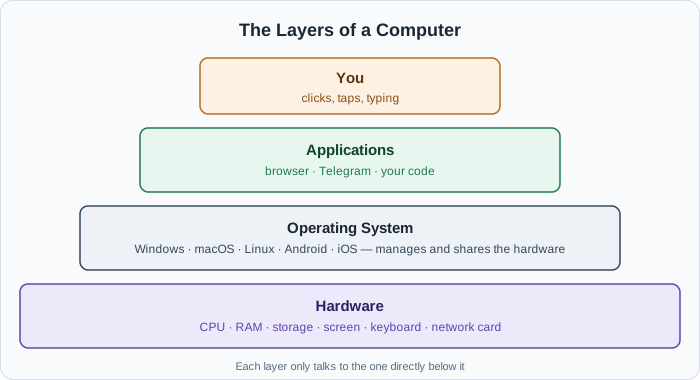
- Hardware — the CPU, RAM, storage, and devices.
- Operating system (OS) — Windows, macOS, Linux, Android, iOS. It manages the hardware and shares it fairly between programs.
- Applications — your browser, your editor, and the programs you write. They ask the OS for what they need.
- You — interacting with the applications.
This layering is why the same Chrome browser can run on thousands of different laptop models: Chrome talks to the operating system, and the operating system deals with the specific hardware. We'll open up the operating system layer properly in chapter 6.
5. Computers Are Everywhere
The word "computer" makes most people picture a laptop, but by the definition above — a machine that follows instructions to process data — computers are everywhere:
- Your phone is a full computer, with a CPU, RAM, storage, and an OS.
- A web server is a computer with no screen, sitting in a data center, answering requests.
- An ATM, a smart TV, a car's dashboard, and a Wi-Fi router all contain small computers.
- Even a washing machine has a tiny computer (called a microcontroller) deciding when to spin.
They differ in size, speed, and purpose, but they all follow the same ideas you'll learn in this series.
6. Why a Developer Should Care
You can write a working website without knowing any of this. But sooner or later, you'll hit questions like:
- Why does my app get slower when there are more users?
- Why did my server crash with "out of memory"?
- Why is reading from a database slower than reading a variable?
- Why does my UI freeze while it loads a big file?
- What is Docker actually isolating?
Every one of those has an answer rooted in the ideas in this series: the CPU, memory, storage, processes, threads, and I/O. Knowing how the machine works turns these from mysteries into problems you can reason about.
7. What This Series Covers
Here's the path ahead:
- What Is a Computer, Really? — you are here
- Bits, Bytes, and Everything Is a Number — how all data becomes numbers
- The CPU — how instructions actually get run
- Memory: RAM vs. Storage — the different places data lives, and why speed matters
- Files and File Systems — how storage is organized into files and folders
- The Operating System — the manager that runs everything
- Processes — what a running program really is
- Threads and Concurrency — doing many things at once
- Input/Output: Talking to the World — why waiting is the slowest part of computing
- Putting It All Together — tracing one click from start to finish
No coding is required. Grab the computer you're reading this on — it is the lab for the whole series.
Buy Me a Coffee
Found this tutorial helpful? Consider buying me a coffee to support more free content!