Protecting a Backend API
Table of Contents
- What We're Building
- Project Setup
- A Public Endpoint
- How JWT Validation Works
- A Token-Protected Endpoint
- A Role-Protected Endpoint
- Trying It End to End
- Beginner Pitfalls
This is the hands-on payoff — everything from
Part 2 through
Part 6 lands
here. The full, runnable version of what this part builds lives in the
source repository's examples/keycloak-nestjs-api —
follow along here, then compare against it.
1. What We're Building
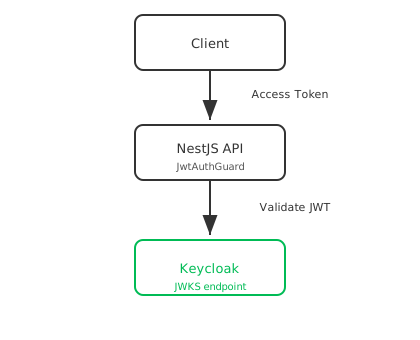
A NestJS API with three routes, against the crash-course realm and
nestjs-api client from
Part 3–Part 4:
GET /public    → no token required
GET /profile   → any valid token
GET /admin     → a token whose realm roles include "admin"
2. Project Setup
nest new keycloak-nestjs-api
cd keycloak-nestjs-api
npm install @nestjs/config @nestjs/passport passport passport-jwt jwks-rsa
npm install -D @types/passport-jwt
.env, matching the realm from
Part 3–Part 4:
PORT=3000
KEYCLOAK_URL=http://localhost:8080
KEYCLOAK_REALM=crash-course
KEYCLOAK_CLIENT_ID=nestjs-api
3. A Public Endpoint
// src/app.controller.ts
import { Controller, Get } from '@nestjs/common';

@Controller()
export class AppController {
  @Get('public')
  getPublic() {
    return { message: 'Anyone can see this — no token required.' };
  }
}
Nothing new here — this is a plain NestJS route with no guard, exactly like every route before this crash course's scope began.
4. How JWT Validation Works
Before writing the guard, it's worth naming exactly what "validate the token" means — four separate checks, all covered conceptually in Part 6:
| Check | What it confirms |
|---|---|
| Signature | The token was issued by this Keycloak realm, unmodified — verified against Keycloak's public key, fetched from its JWKS endpoint |
Issuer (iss) | The token came from the realm we trust, not some other realm or server |
Expiration (exp) | The token hasn't expired |
Audience (aud) | The token was issued for this API, not a token meant for a different client |
We use passport-jwt (a JWT strategy for NestJS's Passport integration)
together with jwks-rsa, which fetches and caches Keycloak's public key
automatically — so signature verification never needs a hardcoded key:
// src/auth/jwt.strategy.ts
import { Injectable } from '@nestjs/common';
import { ConfigService } from '@nestjs/config';
import { PassportStrategy } from '@nestjs/passport';
import { passportJwtSecret } from 'jwks-rsa';
import { ExtractJwt, Strategy } from 'passport-jwt';

export interface KeycloakUser {
  userId: string;
  username: string;
  roles: string[];
}

interface KeycloakTokenPayload {
  sub: string;
  preferred_username: string;
  realm_access?: { roles: string[] };
}

@Injectable()
export class JwtStrategy extends PassportStrategy(Strategy) {
  constructor(config: ConfigService) {
    const issuer = `${config.get<string>('KEYCLOAK_URL')}/realms/${config.get<string>('KEYCLOAK_REALM')}`;

    super({
      jwtFromRequest: ExtractJwt.fromAuthHeaderAsBearerToken(),
      ignoreExpiration: false,
      issuer,
      audience: config.get<string>('KEYCLOAK_CLIENT_ID'),
      algorithms: ['RS256'],
      secretOrKeyProvider: passportJwtSecret({
        cache: true,
        rateLimit: true,
        jwksRequestsPerMinute: 5,
        jwksUri: `${issuer}/protocol/openid-connect/certs`,
      }),
    });
  }

  validate(payload: KeycloakTokenPayload): KeycloakUser {
    return {
      userId: payload.sub,
      username: payload.preferred_username,
      roles: payload.realm_access?.roles ?? [],
    };
  }
}
issuer, audience, algorithms, and ignoreExpiration: false are the
four checks from the table above — passport-jwt rejects the request
before validate() ever runs if any of them fail. validate() only
runs for a token that already passed every check, and its return value
becomes req.user.
Note: by default, a Keycloak access token's
audclaim only containsaccount(Keycloak's built-in account-management client) — not your client's ID. The source repo's example app's realm export adds an Audience protocol mapper to thenestjs-apiclient so its tokens also carry"nestjs-api"inaud, matching theaudiencecheck above — without it, this exact strategy would reject every token.
Wire it up as a module:
// src/auth/auth.module.ts
import { Module } from '@nestjs/common';
import { ConfigModule } from '@nestjs/config';
import { PassportModule } from '@nestjs/passport';
import { JwtStrategy } from './jwt.strategy';

@Module({
  imports: [ConfigModule, PassportModule.register({ defaultStrategy: 'jwt' })],
  providers: [JwtStrategy],
  exports: [PassportModule],
})
export class AuthModule {}
// src/auth/jwt-auth.guard.ts
import { Injectable } from '@nestjs/common';
import { AuthGuard } from '@nestjs/passport';

@Injectable()
export class JwtAuthGuard extends AuthGuard('jwt') {}
5. A Token-Protected Endpoint
// src/app.controller.ts (add to the existing controller)
import { Req, UseGuards } from '@nestjs/common';
import type { Request } from 'express';
import { JwtAuthGuard } from './auth/jwt-auth.guard';
import { KeycloakUser } from './auth/jwt.strategy';

@UseGuards(JwtAuthGuard)
@Get('profile')
getProfile(@Req() req: Request) {
  const user = req.user as KeycloakUser;
  return { message: `Hello, ${user.username}`, user };
}
@UseGuards(JwtAuthGuard) runs the strategy from
§4 before the handler — no Authorization
header, an expired token, or a bad signature all result in a 401
before getProfile ever runs.
6. A Role-Protected Endpoint
Authorization builds on top of authentication — first prove who
(JwtAuthGuard), then check what they're allowed to do
(realm_access.roles, from
Part 6):
// src/auth/roles.decorator.ts
import { SetMetadata } from '@nestjs/common';

export const ROLES_KEY = 'roles';
export const Roles = (...roles: string[]) => SetMetadata(ROLES_KEY, roles);
// src/auth/roles.guard.ts
import {
  CanActivate,
  ExecutionContext,
  ForbiddenException,
  Injectable,
} from '@nestjs/common';
import { Reflector } from '@nestjs/core';
import type { Request } from 'express';
import { KeycloakUser } from './jwt.strategy';
import { ROLES_KEY } from './roles.decorator';

@Injectable()
export class RolesGuard implements CanActivate {
  constructor(private readonly reflector: Reflector) {}

  canActivate(context: ExecutionContext): boolean {
    const requiredRoles = this.reflector.getAllAndOverride<string[]>(
      ROLES_KEY,
      [context.getHandler(), context.getClass()],
    );
    if (!requiredRoles || requiredRoles.length === 0) return true;

    const request = context.switchToHttp().getRequest<Request>();
    const user = request.user as KeycloakUser;
    const hasRole = requiredRoles.some((role) => user.roles.includes(role));

    if (!hasRole) {
      throw new ForbiddenException(
        `Requires one of these roles: ${requiredRoles.join(', ')}`,
      );
    }
    return true;
  }
}
// src/app.controller.ts (add to the existing controller)
import { Roles } from './auth/roles.decorator';
import { RolesGuard } from './auth/roles.guard';

@UseGuards(JwtAuthGuard, RolesGuard)
@Roles('admin')
@Get('admin')
getAdmin(@Req() req: Request) {
  const user = req.user as KeycloakUser;
  return { message: `Welcome, admin ${user.username}` };
}
JwtAuthGuard runs first (populates req.user), then RolesGuard reads
req.user.roles and checks it against @Roles('admin'). A missing
token still fails at JwtAuthGuard with 401; a valid token missing the
role fails at RolesGuard with 403 — two different failures, checked
in order.
7. Trying It End to End
Get a token for meng (user role) using the password grant from
Part 6:
TOKEN=$(curl -s -X POST http://localhost:8080/realms/crash-course/protocol/openid-connect/token \
  -d grant_type=password \
  -d client_id=nestjs-api \
  -d username=meng \
  -d password=<meng's password> \
  | python3 -c "import sys,json; print(json.load(sys.stdin)['access_token'])")
curl http://localhost:3000/public
# 200 — { "message": "Anyone can see this — no token required." }

curl http://localhost:3000/profile
# 401 — no Authorization header

curl http://localhost:3000/profile -H "Authorization: Bearer $TOKEN"
# 200 — { "message": "Hello, meng", "user": { ... } }

curl http://localhost:3000/admin -H "Authorization: Bearer $TOKEN"
# 403 — meng only has the "user" role
Fetch a token for admin instead and repeat the last call — it returns
200, since that user carries the admin realm role from
Part 4.
8. Beginner Pitfalls
- Forgetting the audience mapper. Without it, every token's
audis justaccount, and this exactJwtStrategyrejects every request — see the note in §4. - Checking roles before checking the token.
RolesGuardmust run afterJwtAuthGuardin@UseGuards(...)— reversing the order meansRolesGuardruns against a request with noreq.useryet. - Trusting
req.userwithout guards.@Req() req: Requestalone doesn't populatereq.user— only a route withJwtAuthGuardapplied does. A route without the guard has noreq.userat all.
Official docs:
Buy Me a Coffee
Found this tutorial helpful? Consider buying me a coffee to support more free content!